Samsung’s One UI 9 update is officially rolling out, and it is a bigger step than the One UI 8.5 update most Galaxy phones are running right now. Built on Android 17, it brings a redesigned Now Bar, deeper Gemini AI integration, and, for the first time, two-way file sharing with iPhones.
If you are wondering when your phone will get the One UI 9 update, this guide covers the real release timeline for every Galaxy series, what is actually new compared with One UI 8.5, and how to check for or install the update once Samsung makes it available to you.
One UI 9, based on Android 17, is already running on the Galaxy Z Fold 8, Z Fold 8 Ultra, and Z Flip 8, which shipped with it in July 2026. Samsung has confirmed the stable update for the Galaxy S26 series is coming soon, while the Galaxy S25, S24, S23, and older foldables are currently in public beta and expected to get the stable release over the following months.
Table of Contents
ToggleWhat Is One UI 9?
One UI 9 is Samsung’s ninth major software version for Galaxy phones and tablets, built on Google’s Android 17. It follows One UI 8.5, the smaller interim update that most current Galaxy devices are running today.
Samsung has shipped One UI 6, 7, 8, and 8.5 in recent years, each roughly tied to an annual Android release plus a mid-cycle refresh. One UI 9 follows that same rhythm, pairing a new Android version with a longer list of design changes, Galaxy AI features, and security improvements. According to SamMobile’s coverage of the update, though, much of the actual change happens under the hood at the Android 17 level, and the visible, user-facing changelog is comparatively focused rather than a complete redesign.
One UI 9 Update: When Is It Coming to Your Phone?
Samsung did not release One UI 9 to every device at once. It launched first on brand-new hardware, then moved through a public beta before reaching a stable release on existing phones, the same pattern Samsung has followed for past One UI versions.
Already available: Galaxy Z Fold 8, Z Fold 8 Ultra, and Z Flip 8
The Galaxy Z Fold 8, Z Fold 8 Ultra, and Z Flip 8 were the first Galaxy phones to run One UI 9. They launched with it pre-installed when Samsung unveiled the lineup on July 22, 2026. If you own one of these foldables, you already have One UI 9 — there is nothing to download.
Next: Galaxy S26, S26+, and S26 Ultra
The Galaxy S26 series has been in an extended One UI 9 beta cycle running through multiple builds since earlier in 2026. On September 1, 2026, Samsung confirmed on its official Members community forum that the stable One UI 9.0 update for the Galaxy S26 series is coming soon.
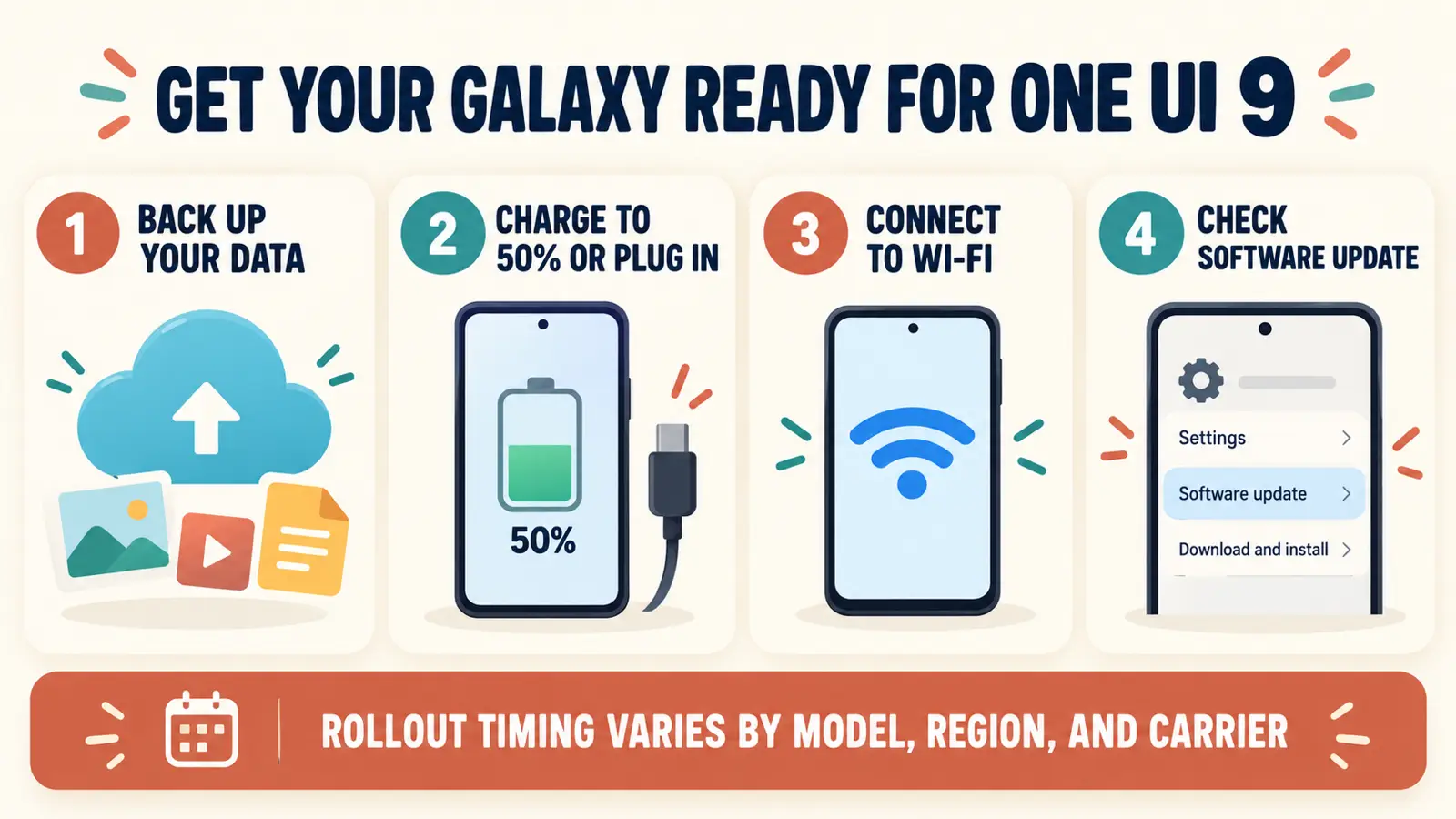
Samsung typically posts that kind of confirmation only when a stable rollout is close, so S26 owners should watch for a software update notification. As of this writing, the stable update had not yet gone out publicly — check Settings > Software update on your phone for the current status, since rollout timing can vary by region and carrier.
In public beta: Galaxy S25, S24, S23, and older foldables
Samsung expanded the One UI 9 beta program significantly in late August and early September 2026. The Galaxy S25, S25+, S25 Ultra, and S25 FE received their first beta build around September 1. The Galaxy Z Fold 7, Z Flip 7, Z Fold 6, and Z Flip 6 followed a few days later, and the Galaxy S24 series and Galaxy S23 series joined the beta program in early September — the S23 line’s first build went live in select markets, including India, on September 3.
Beta enrollment happens through the Samsung Members app, currently available in South Korea, the UK, the US, and India. Joining the beta gets you One UI 9 early, but expect occasional bugs — it is not the same as a finished, stable release.
Everyone else: rolling out in phases
Samsung’s wider Galaxy lineup, including additional Galaxy A-series phones, tablets, and remaining device variants, will get One UI 9 as a stable release over the following months, following Samsung’s usual update cadence. Exact timing depends on your specific model, region, and carrier. SamMobile maintains an updated eligibility list covering every Galaxy phone and tablet confirmed for One UI 9, which is worth checking if your device is not mentioned here.
Here is a quick snapshot of where things stood as of early September 2026:
| Device | One UI 9 status |
|---|---|
| Galaxy Z Fold 8, Z Fold 8 Ultra, Z Flip 8 | Shipped with it — available now |
| Galaxy S26, S26+, S26 Ultra | Stable update confirmed, rolling out soon |
| Galaxy S25, S25+, S25 Ultra, S25 FE | Public beta |
| Galaxy S24, S24+, S24 Ultra | Public beta |
| Galaxy S23, S23+, S23 Ultra | Public beta (just started) |
| Galaxy Z Fold 7 / Flip 7, Z Fold 6 / Flip 6 | Public beta |
| Other Galaxy A-series phones and tablets | Expected later, phased rollout |
What's New in One UI 9 (Compared With One UI 8.5)
One UI 9’s changes are more incremental than a full visual overhaul, but there is enough here to notice on day one.

Design: a cleaner Now Bar and squared-off widgets
The Now Bar, the pill-shaped status area Samsung introduced in One UI 7, gets a darker background treatment with animations that respond when music is playing. Samsung’s widgets are also shifting toward more squared-off corners for a more consistent look across the home screen, and the media player has a cleaner layout with polished playback controls and animated audio-wave visuals, according to SamMobile’s breakdown of the design changes.
AI and productivity: Now Brief and deeper Gemini integration
One UI 9 leans further into Galaxy AI with a Smarter Now Nudge that offers proactive suggestions and reminders, and a Customizable Now Brief that tailors your daily summary card to how you actually use your phone. Samsung has also deepened its Gemini Intelligence integration on Galaxy AI-enabled devices, building on the Google partnership introduced in earlier One UI versions.
Cross-platform sharing: Quick Share now talks to AirDrop
One of the more genuinely useful additions is expanded interoperability between Samsung’s Quick Share and Apple’s AirDrop. On the Galaxy S26 series, Quick Share supports two-way file transfers with iPhones, iPads, and Macs, with no third-party app required on either side. iPhone users need iOS 26.6 or later and AirDrop visibility set to Everyone to receive files from a Galaxy device.
This builds on Quick Share-to-AirDrop support that Samsung began testing in a One UI 8.5 beta earlier in 2026, and it is now a confirmed, built-in feature rather than an experimental one.
Samsung Notes, accessibility, and app security
Samsung Notes adds a new “Tape” feature for organizing and annotating more complex notes, along with additional pen line styles. Quick Settings also gets more flexibility to rearrange and prioritize your most-used toggles.
Accessibility improves with a unified TalkBack experience that combines features Google and Samsung previously offered separately, an adjustable Mouse Key speed for smoother cursor control, and a new Text Spotlight tool that displays selected text larger inside a floating window.
On the security side, One UI 9 adds stronger warnings and blocking for suspicious or high-risk app installations, on top of the monthly security patches Samsung continues to ship with every update.
Back up your photos, messages, and app data through Samsung Cloud or Google’s backup tools before installing any major update, including One UI 9. If something goes wrong during or after the update and you lose files, our guide on recovering deleted files from Android covers the safe methods that actually work.
How to Check for and Install the One UI 9 Update
Once One UI 9 reaches your device, here is how to get it:
- Open the Settings app.
- Scroll down and tap Software update.
- Tap Download and install, then follow the on-screen prompts if an update is available.
- If you see “Your software is up to date” and no One UI 9 update appears, your device has not received the stable rollout yet. Samsung releases updates in waves by region and carrier, so check back periodically.
You can confirm your current version anytime under Settings > About phone > Software information — “One UI 9” will appear there once it is installed. If you want to verify the exact monthly security patch your phone is running, our guide on how to check your Android security patch level walks through the steps.
A few things to check before installing:
- Make sure your phone has at least 20 to 25 percent battery, or keep it plugged in during the update.
- Confirm you have enough free storage for the download; large system updates can require several gigabytes of free space.
- Connect to Wi-Fi rather than mobile data to avoid a slow or interrupted install.
If your device is eligible and you want early access, open the Samsung Members app, look for the One UI Beta Program banner, and follow the enrollment steps. Beta software can be unstable, so it is worth avoiding on your only phone.
Avoid downloading firmware files from unofficial third-party sites to install One UI 9 manually. That risks bricking your device or voiding your warranty. Wait for the official OTA update, or use Samsung’s own Smart Switch or Software Update tools instead.
What About the Galaxy Watch 8 and One UI 9 Watch?
One UI 9 is not just for phones. The Galaxy Watch 8 series has its own related beta track called One UI 9 Watch, built on Wear OS 7. It is a separate update from the phone software covered in this guide, and it is currently rolling out as a beta in South Korea and the US.
One UI 9 Watch adds new health insights such as Cardio Load, Sleep Vitals, and Heart Health, along with expanded watch face customization. If you are looking specifically for wearable software news, treat it as related but distinct from the One UI 9 update your phone will eventually receive.
Still on One UI 8.5 and dealing with battery drain or overheating while you wait for One UI 9? Here is how to fix it.
Frequently Asked Questions
Is One UI 9 out yet?
Yes, in stages. It is already running on the Galaxy Z Fold 8, Z Fold 8 Ultra, and Z Flip 8. Samsung has confirmed the stable update for the Galaxy S26 series is coming soon, and the Galaxy S25, S24, S23, and older foldables are currently in public beta.
Will my Galaxy phone get the One UI 9 update?
Most Galaxy S, Z, A, and Tab devices released in the last few years are expected to get One UI 9 eventually. SamMobile maintains an updated eligibility list if you want to check your specific model.
What is different between One UI 9 and One UI 8.5?
One UI 9 is a full-version update built on Android 17, with more noticeable design, AI, and cross-platform sharing changes than the smaller One UI 8.5 update most Galaxy phones are currently running.
How do I join the One UI 9 beta?
Open the Samsung Members app on an eligible device, look for the One UI Beta Program banner, and follow the enrollment steps. The beta program is currently available in South Korea, the UK, the US, and India.
Does One UI 9 fix the One UI 8.5 battery drain issue?
Samsung has not framed One UI 9 as a dedicated fix for the battery drain and overheating some users reported after One UI 8.5. If you are dealing with that issue now, see our troubleshooting guide while you wait for the update to reach your device.
Is One UI 9 Watch the same as One UI 9?
No. One UI 9 Watch is a separate, Wear OS 7-based update for the Galaxy Watch 8 series. It shares a name and a general timeline with the phone update, but it is different software.
One UI 9 is in the middle of a staged rollout: already live on the newest foldables, imminent for the Galaxy S26 series, and moving through beta on the S25, S24, S23, and older foldables. If your phone has not shown the update notification yet, the fastest way to check is Settings > Software update. Samsung’s rollout waves do not follow a fixed public schedule, but the update is coming to most current Galaxy devices over the months ahead.