Windows 11 26H2, also called the Windows 11 2026 Update, is now generally available. Microsoft released it on September 29, 2026, and is offering it to eligible PCs running Windows 11 24H2 or 25H2 through Windows Update.
The rollout is phased, so many PCs will not see it on day one. This guide explains how the rollout works, how to install 26H2 with a single restart, where to get official installation media, and what to check first.
If a PC will not boot after a clean install and reports that no operating system was found, see how to fix “Operating system not found”.
Windows 11 26H2 has been generally available since September 29, 2026. On a 24H2 or 25H2 PC, open Settings > Windows Update, turn on Get the latest updates as soon as they’re available, and select Download & install when 26H2 appears. It installs as a small enablement package and needs one restart. If it is not offered yet, your PC may still be waiting in the phased rollout or under a safeguard hold.
26H2 does not change how Copilot is set up; if you would rather not use it, here is how to turn off Copilot in Windows 11.
Table of Contents
ToggleWindows 11 26H2 Release Date and Current Status
Microsoft made Windows 11, version 26H2 generally available on September 29, 2026. Home and Pro PCs receive it through Windows Update, and organisations can deploy it through Windows Update for Business, WSUS, Windows Autopatch and the Microsoft 365 admin center.
The update moves the PC to the 26300 build series. Installing it also resets the support clock: Home and Pro editions get 24 months of updates, and Enterprise and Education editions get 36 months.
| Date | What happened |
|---|---|
| August 27, 2026 | 26H2 (Build 26300.9278) reached the Release Preview Channel for Windows Insiders. |
| September 22, 2026 | Optional preview update KB5124010 shipped. It is the base update the 26H2 enablement package builds on. |
| September 29, 2026 | General availability. The phased rollout began through Windows Update. |
| October 13, 2026 | Windows 11 24H2 Home and Pro reached end of updates. |
See Windows 11 24H2 end of support for what that deadline means for your PC.
How the Phased Rollout and Safeguard Holds Work
Microsoft does not offer 26H2 to every PC at once. It starts with devices that have the Get the latest updates as soon as they’re available setting turned on, then widens the rollout as it confirms the update is working well.
If Microsoft detects a compatibility problem with a particular driver, app or hardware configuration, it can apply a safeguard hold. That PC will not be offered 26H2 until the issue is fixed. A hold protects the device, so do not try to bypass it with registry changes or third-party tools.
Managed work or school PCs may not show 26H2 until IT approves it. In that case, your organisation’s update policies control the timing, not the public rollout.
Which PCs Can Get Windows 11 26H2?
The quick enablement-package route is for PCs already running Windows 11 24H2 or 25H2. These versions share the same servicing branch and code base, so most 26H2 changes are already on the PC. The enablement package (KB5121794) switches them on.
The PC also needs the September 22, 2026 update (KB5124010) or a later cumulative update. Windows Update installs this for you when you keep the PC up to date.
PCs on Windows 11 23H2 or older use a different servicing branch. They need a full feature update, which is a much larger download and takes longer. The standard Windows 11 hardware requirements still apply, including TPM 2.0, Secure Boot capability, a supported 64-bit processor, 4 GB of RAM and 64 GB of storage.
If a clean install fails to boot with error 0xc0000225, follow these 0xc0000225 fixes; if Windows asks for activation afterwards, see how to activate Windows 10 or move to Windows 11.
How to Install Windows 11 26H2
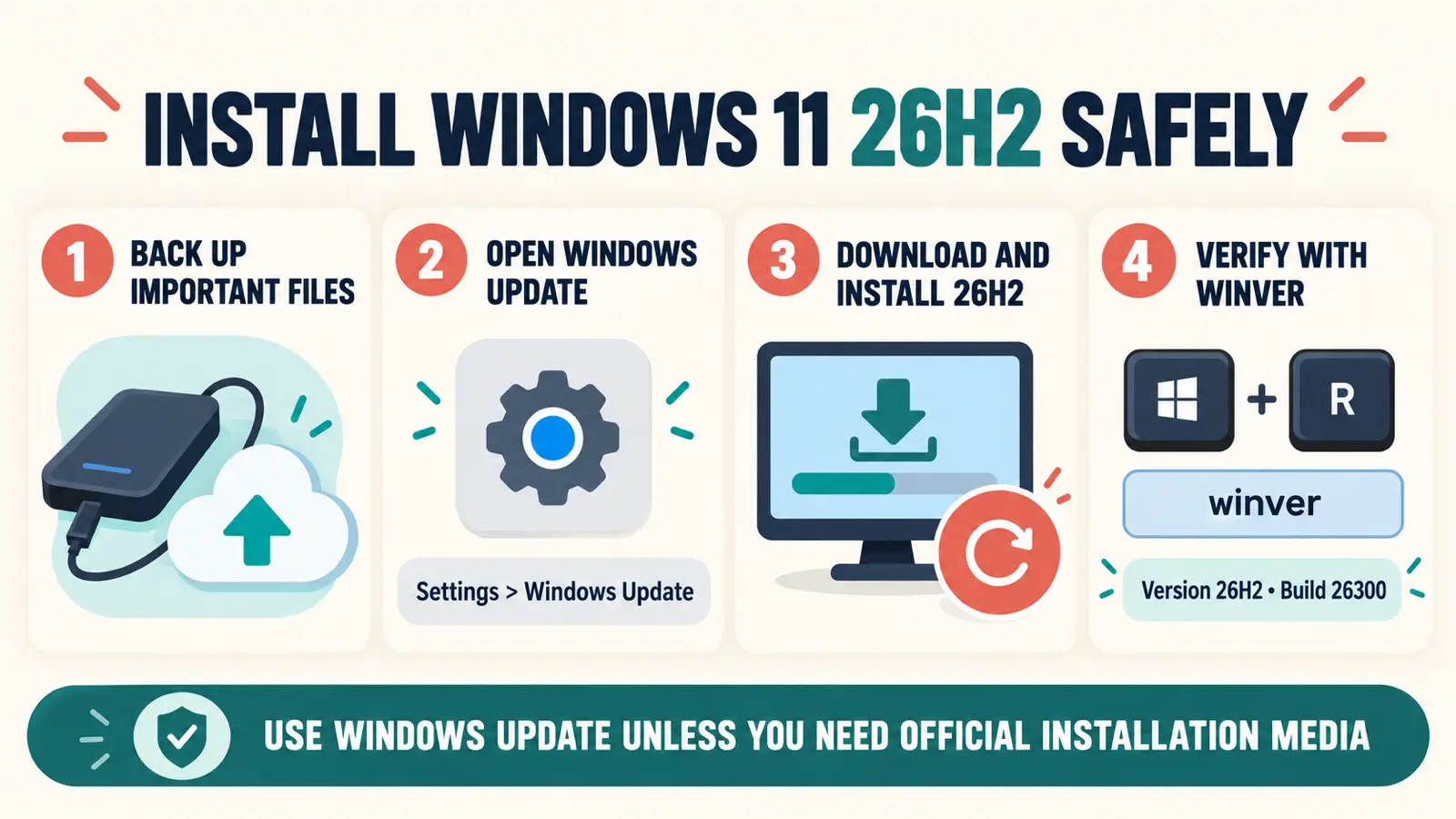
Back up important files before any feature update. Then follow these steps on a PC running 24H2 or 25H2.
- Open Settings > Windows Update.
- Turn on Get the latest updates as soon as they’re available if you want the update as early as Microsoft allows.
- Select Check for updates and install any pending cumulative updates first. Restart if asked.
- When Windows 11, version 26H2 appears, select Download & install.
- Save your work and select Restart now when prompted. One restart completes the upgrade.
If your wallpaper turns black after the upgrade, here is how to fix a black wallpaper after an update.
On an up-to-date 24H2 or 25H2 PC, the enablement package is tiny and the restart is about as quick as a monthly update. If Windows starts a long download instead, the PC is probably taking the full feature-update path.
Check That the Upgrade Worked
Press Windows + R, type winver and press Enter. The window should show Version 26H2 and an OS build that starts with 26300. You can also check Settings > System > About.
Windows 11 26H2 ISO and Installation Media
Most people do not need an ISO. Windows Update is the simplest and safest upgrade path for an existing PC.
If you need a clean installation, a repair install or bootable USB media, use Microsoft’s official Windows 11 download page. It offers the Installation Assistant, the Media Creation Tool and a disk image (ISO) for x64 PCs.
Avoid ISO files from mirrors, torrents or modified builds. You cannot verify what was added or removed.
To put the ISO on a USB stick without extra tools, see how to create a bootable USB with CMD.
Windows 11 26H2 Not Showing in Windows Update?
During a phased rollout, a missing offer is normal. Check these points before you assume something is wrong:
- Run
winverand confirm the PC is on 24H2 or 25H2. - Install all pending cumulative updates and restart.
- Turn on Get the latest updates as soon as they’re available.
- Check Microsoft’s Windows release health page for safeguard holds and known issues.
If it still does not appear, your PC is probably waiting for a later rollout wave or is under a hold.
If you are still on 25H2 in the meantime, here is what Windows 11 25H2 added.
Step-by-step checks for a missing 26H2 offer, including rollout waves, pending updates and safeguard holds.
Known Issues to Check Before You Update
Microsoft’s status as checked on October 19, 2026 lists three current KB5127648 issues that also affect 26H2 PCs:
- Smart App Control: some devices cannot turn it on because the option is grayed out. Already-enabled devices are unaffected.
- Remote Desktop: non-admin users can receive error
0xC000000Dwhen connecting to hosts with Administrator protection enabled. The issue is open; temporarily disabling Administrator protection is only an enterprise workaround. - USB Audio Class 1.0: partly resolved. Some Code 10 and no-sound symptoms remain.
KB5127648 resolved the earlier AC-3 app crashes and virtual-desktop File Explorer failures. KB5124010 resolved the earlier domain-trust problem. See our monthly Windows 11 update problems tracker for the latest status.
Our review of what actually changes in 26H2, the pros and cons, and who should wait before upgrading.
Frequently Asked Questions
Is Windows 11 26H2 available now?
Yes. Microsoft made Windows 11 26H2 generally available on September 29, 2026. It is rolling out gradually, so your PC may not see it immediately.
What is the Windows 11 26H2 release date?
The public release date is September 29, 2026. It was in the Windows Insider Release Preview Channel from August 27, 2026.
Can I upgrade from Windows 11 24H2 to 26H2?
Yes. 24H2 and 25H2 PCs can upgrade through Windows Update with a small enablement package and one restart. It is a sensible option for 24H2 Home and Pro users, whose support ended on October 13, 2026.
Still on Windows 10? See whether paying for Windows 10 ESU is worth it.
Is the Windows 11 26H2 upgrade free?
Yes. It is a free feature update for genuine, eligible Windows 11 PCs. Official installation media is also free from Microsoft’s Windows 11 download page.
Why is Windows 11 26H2 not showing?
The rollout is phased, a pending update or restart may be needed, or Microsoft may have placed a safeguard hold on the PC. Work or school PCs may also be controlled by IT.
How do I know which version I have?
Press Windows + R, type winver and press Enter. Windows 11 26H2 shows Version 26H2 and an OS build starting with 26300.