AI scams now include two different risks: criminals using AI to make familiar scams more convincing, and malicious content trying to redirect an AI browser agent. The second risk is called indirect prompt injection. It matters most when an agent can read untrusted pages while also accessing logged-in accounts or taking actions.
The goal is not to avoid every AI tool. It is to give an agent only the access needed for a specific task and keep a human checkpoint before anything consequential.
Treat a browser agent like a temporary assistant, not an all-access account owner. Use logged-out mode when possible, enable only the apps needed for the task, give narrow instructions, review every confirmation, and keep passwords, recovery codes, private documents, and payment details out of the chat.
Table of Contents
ToggleWhat AI Scams and Browser Agents Actually Mean
An AI-enabled scam uses tools such as generated text, cloned audio, or synthetic images to impersonate someone or make a false story look convincing. A browser-agent attack is different: it targets the assistant that is browsing or acting for you.
Modern agents may be able to open pages, use connected apps, draft messages, or change account settings. The exact access depends on the product and what you authorize. OpenAI warns that logged-in sites and enabled apps can expose sensitive data to an agent, which is why unnecessary access should be disabled. (OpenAI Help Center)
How Indirect Prompt Injection Reaches an Agent
Prompt injection is malicious instruction text designed to change an AI system’s behavior. With indirect prompt injection, that text sits inside content the agent later reads, such as a webpage, email, attachment, shared document, forum post, or calendar invitation.
The dangerous combination is untrusted content plus useful permissions. A page cannot magically control every agent. Harm becomes possible when an agent misinterprets the page as an instruction and also has permission to take a related action. OWASP lists prompt injection, tool abuse, data exfiltration, and excessive agency among the important risks for agent systems. (OWASP AI Agent Security)
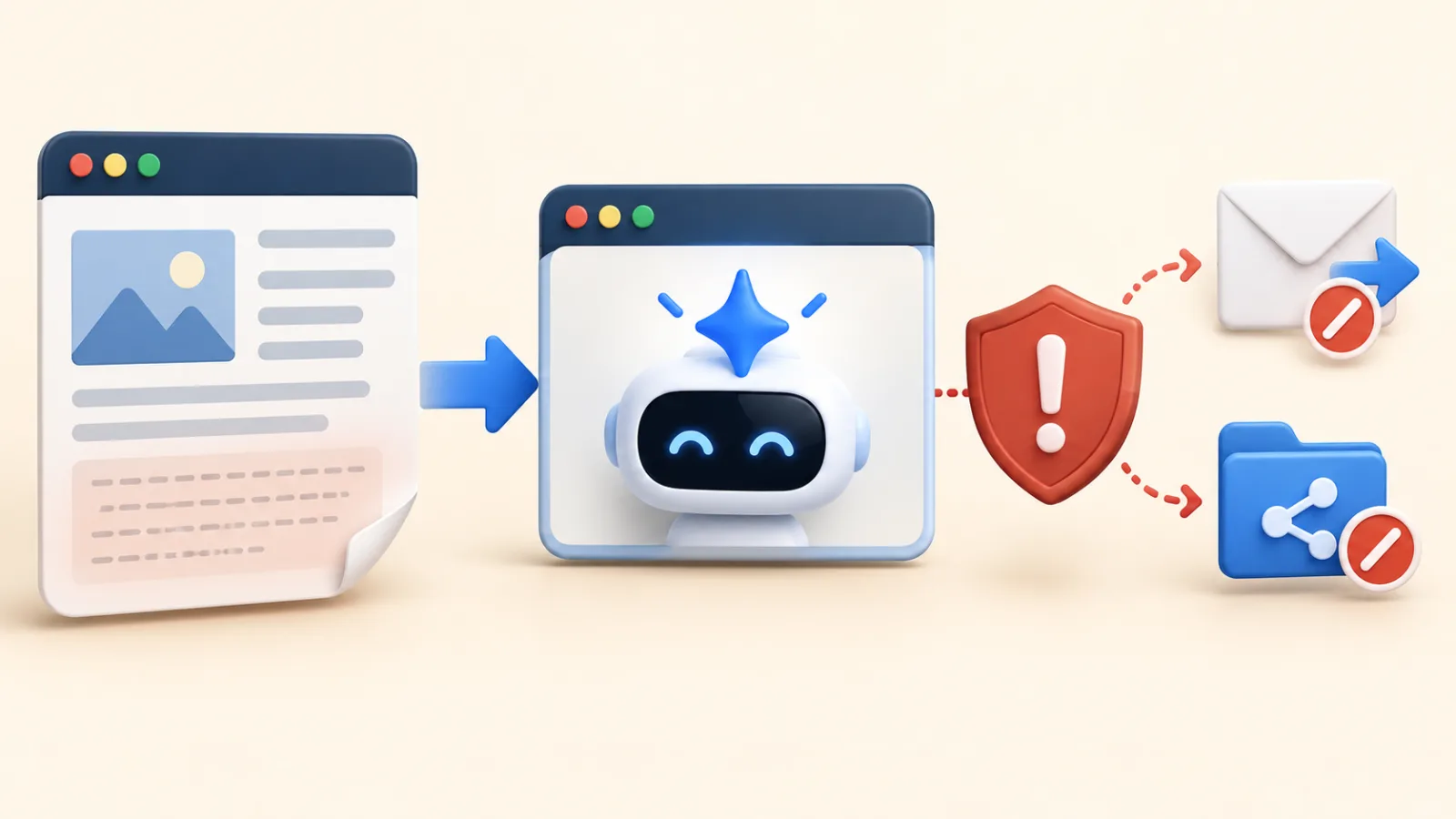
Security demonstrations and vendor red-team examples show what could happen if safeguards fail; they do not prove that every agent or webpage is compromised. OpenAI describes prompt injection as an open, long-term security challenge and continues to harden Atlas against newly discovered attack strategies. (OpenAI security research)
What a Compromised Agent Could Do
A successful attack could make an agent drift away from your original request. Depending on its permissions, that might mean exposing information, drafting or sending an unintended message, changing a cloud file, or attempting another action you did not request.
Those outcomes are conditional, not automatic. Confirmation prompts, restricted tools, login boundaries, monitoring, and provider safeguards can stop or limit them. Your safest assumption is that confirmations reduce risk but do not replace careful review.
7 Ways to Protect Yourself From AI Scams
Use these seven controls to reduce exposure to browser-agent attacks and related AI scams:
- Use logged-out mode for public research. Do not expose account cookies when the task only needs open websites.
- Enable only the required apps or sites. Disconnect email, storage, calendar, and other services when the task is finished.
- Give a narrow instruction. “Summarize this page” is safer than “review everything and take whatever action is needed.”
- Separate reading from acting. Ask the agent to summarize or draft first. Send, upload, delete, purchase, or publish only after a separate review.
- Read the full confirmation. Check the destination, account, file, amount, and information being shared before approving.
- Enter secrets yourself. Use a product’s protected takeover or manual-entry mode for passwords and private information when available.
- Stop unexpected behavior immediately. Cancel the task if the agent changes scope, opens unrelated accounts, or proposes an action you did not request.
OpenAI recommends limited logged-in access, careful review of confirmations, and specific instructions for Atlas. These habits also reflect OWASP’s least-privilege and human-in-the-loop guidance.

A confirmation window is useful only if you read it. Do not approve a send, purchase, file share, account change, or disclosure merely because the agent says it is required. Verify the action against your original request.
How AI Makes Familiar Scams More Convincing
AI can also strengthen ordinary impersonation and phishing scams. A polished message is not proof that the sender is genuine, and a familiar voice is not proof that a relative or manager is calling.
The FTC warns that scammers can clone a loved one’s voice from a short audio sample. If someone asks for urgent money or sensitive information, pause and contact that person through a phone number or channel you already trust. (FTC consumer guidance)
For broader device protection, follow the Windows 11 security checklist and use two-factor authentication on important accounts. Antivirus can help with malicious files, but it cannot decide whether an AI-generated message or agent request is trustworthy.
What to Do If an AI Agent Acts Unexpectedly
If an agent behaves unexpectedly, take these steps in order:
- Stop the task and do not approve the pending action.
- Sign out of any sensitive site opened during the session and disconnect unnecessary apps or integrations.
- Review sent messages, shared files, account changes, purchases, and recent sign-ins.
- Change a password only if it may have been exposed or the account shows suspicious activity; then revoke other sessions and confirm two-factor authentication.
- Contact your bank or card provider immediately if payment information or money may be affected.
- Report the incident to the AI provider and the service involved. Report impersonation or fraud to the relevant authority in your country.
Keep screenshots, confirmation text, timestamps, and transaction references if they can be collected safely. They may help the provider or financial institution investigate.
Frequently Asked Questions
Can hidden text on a webpage control every AI browser agent?
No. Hidden or malicious instructions create a risk, but success depends on the model, safeguards, task context, and permissions. Treat untrusted content cautiously without assuming every page can hijack an agent.
Is it safe to let an AI agent shop online?
It can help compare products or prepare a cart. Review the seller, item, delivery details, total price, and payment step yourself, and keep a separate confirmation before purchase.
Does a confirmation prompt make an AI agent completely safe?
No. Confirmation adds an important human checkpoint, but you still need to read the exact action and information being shared before approving it.
Can antivirus stop prompt injection?
Traditional security software can block some malicious downloads and websites, but prompt injection targets the AI workflow. Limited permissions, narrow tasks, and human approval are still required.
What information should I avoid giving an AI agent?
Avoid passwords, one-time codes, recovery keys, full payment details, identity documents, and confidential files unless the task truly requires them and the product provides an appropriate protected method.