Difference Between Linux, Unix, Mac and Windows: A Simple Guide

Anwar AlamAnwar AlamPublished Jun 7, 2022Updated Sep 26, 202312 min read0 comments
difference between Linux, Unix, Mac and Windows
Quick Answer

The main difference between Linux, Unix, Mac and Windows comes down to who makes them, how open they are, and what they are used for. Windows is a paid, closed system from Microsoft for general use. macOS is Apple’s Unix-based system for its own hardware. Linux is a free, open-source, Unix-like system used widely on servers. Unix is the older family they descend from. This guide explains each clearly.

If you have ever wondered about the difference between Linux, Unix, Mac and Windows, you are not alone.

They are all operating systems, the software that runs your computer, but they differ in origin, cost, openness, and typical use.

This guide explains each one in plain language and compares them so you can see how they relate.

What Is an Operating System?

Before comparing them, it helps to know what an operating system actually does.

It is the core software that manages your hardware and runs your apps.

It handles the screen, storage, memory, network, and everything you interact with.

Windows, macOS, Linux, and Unix are all operating systems, each with a different design and history.

What Is Windows?

Windows is the operating system made by Microsoft, and it is the most widely used on personal computers.

It is a paid, closed-source system, meaning the code is not public.

It runs on a huge range of hardware from many manufacturers.

Windows is known for broad software and game support and a familiar, easy interface.

What Is macOS?

macOS is Apple’s operating system, made only for its own Mac computers.

It is based on Unix, which gives it a stable, secure foundation.

It is closed-source and tightly integrated with Apple hardware and other Apple devices.

macOS is popular for creative work and for its polished, consistent design.

What Is Linux?

Linux is a free, open-source operating system that anyone can use, change, and share.

It is Unix-like, meaning it works in a similar way to Unix without being Unix itself.

It comes in many versions, called distributions, such as Ubuntu, Fedora, and Debian.

Linux runs most of the world’s servers and is popular with developers and enthusiasts.

What Is Unix?

Unix is the older operating system family that inspired both macOS and Linux.

It was created decades ago and set many standards that modern systems still follow.

True Unix systems are used mostly in large business and academic servers.

Today, most people meet Unix indirectly through its descendants like macOS and Linux.

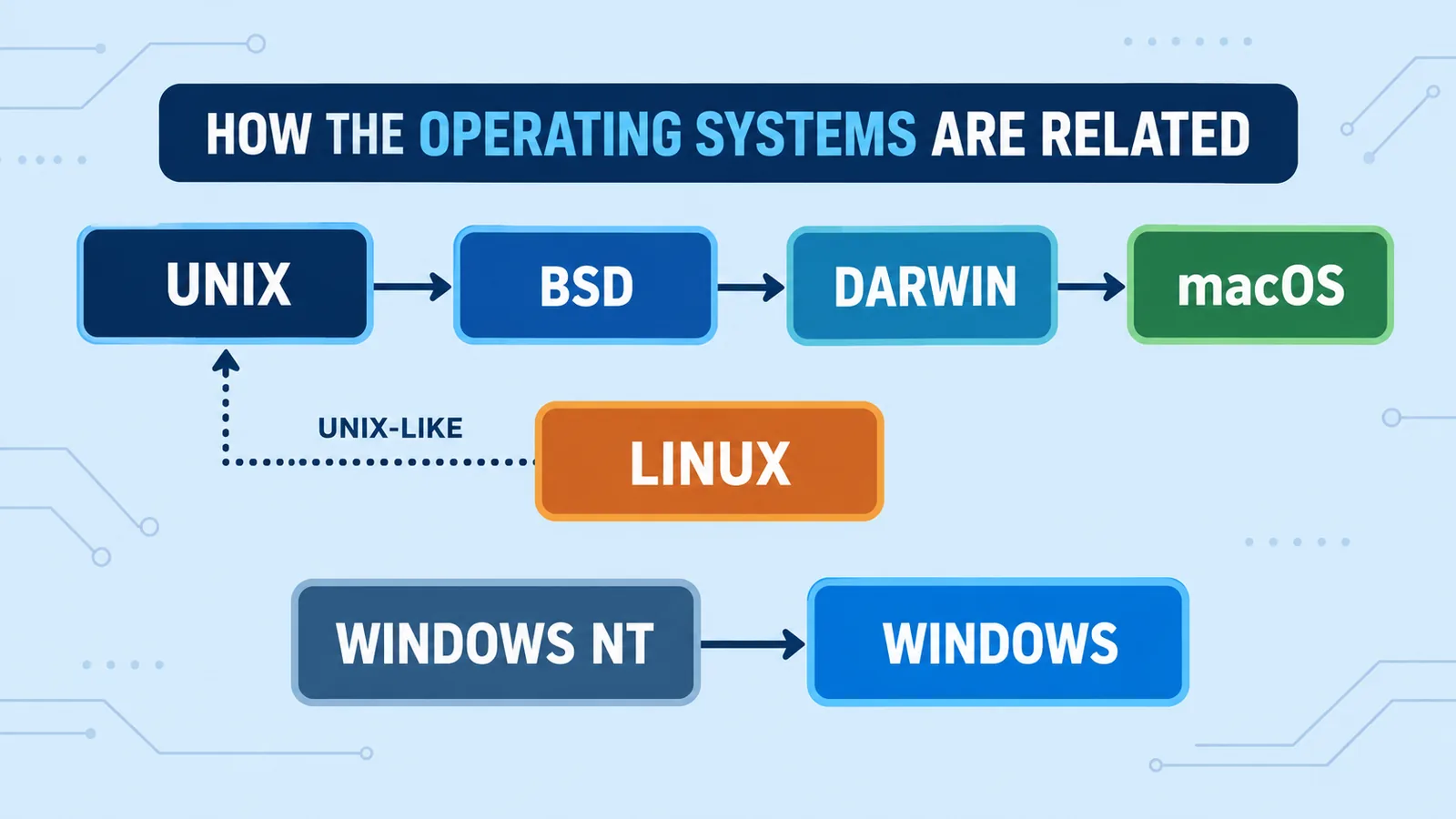
How They Are Related

These systems are more connected than they first appear.

Unix came first and influenced almost everything after it.

macOS is built on a Unix foundation and is officially Unix-certified.

Linux was created to work like Unix but with free, open code, so it is called Unix-like.

Windows developed separately and does not share this Unix heritage.

Related guide

Mac vs PC: An Honest Comparison to Help You Choose in 2026

Deciding between a Mac and a Windows PC? This honest comparison helps.

Cost: Free vs Paid

Cost is one clear difference between Linux, Unix, Mac and Windows.

Linux is free to download and use.

Windows is paid, usually included in the price of a new PC.

macOS is free but only runs on Apple hardware, which you pay for.

Traditional Unix systems are commercial and used mainly by businesses.

Open Source vs Closed Source

Openness is another key difference.

Linux is open-source, so anyone can see and change its code.

Windows and macOS are closed-source, controlled by Microsoft and Apple.

Unix has both commercial closed versions and open descendants.

Open source is why Linux is so flexible and widely customised.

Hardware Support

The systems differ in what hardware they run on.

Windows runs on the widest range of PCs from many brands.

macOS runs only on Apple’s Mac computers.

Linux runs on almost anything, including old PCs and tiny devices.

Unix is usually tied to specific business server hardware.

Ease of Use

How easy each system is to learn varies.

Windows and macOS are designed to be beginner-friendly with polished interfaces.

Linux has become much easier but can still ask more of the user.

Unix is aimed at professionals and is the least beginner-focused.

Software and App Availability

The apps you can run differ between them.

Windows has the widest software and game library.

macOS has strong creative apps and good general software.

Linux has excellent free and open software, though some mainstream apps are missing.

Unix software is specialised for servers and business use.

Security

All can be secure, but their risk profiles differ.

Windows faces the most malware simply because it is the most common.

macOS and Linux face fewer threats, partly due to smaller share and strong design.

Unix systems are built for stability and are well hardened in professional settings.

On any system, updates and safe habits matter most.

Who Uses Each System?

Each system suits different people and roles.

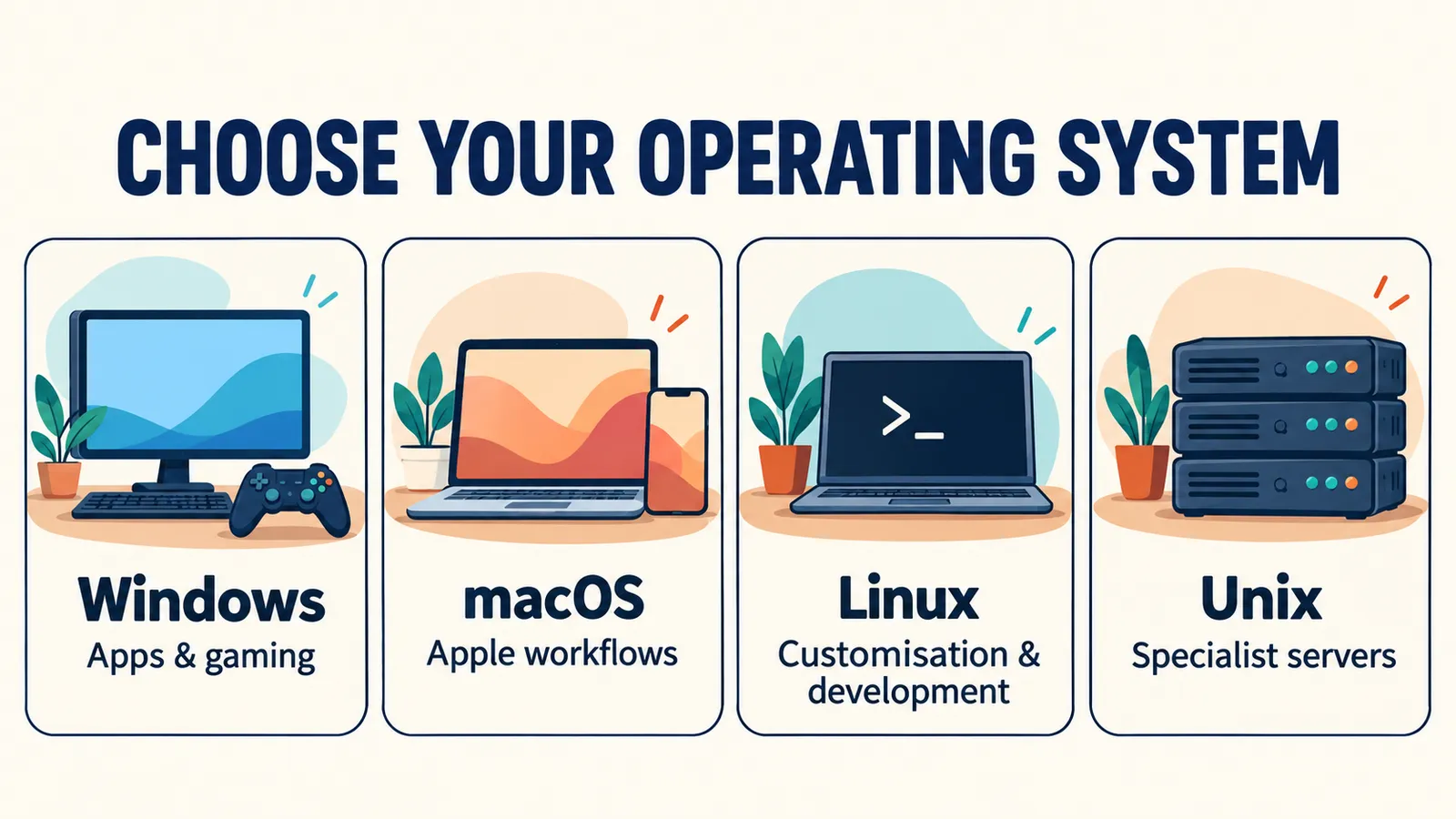
  • Windows — most home users, offices, and gamers
  • macOS — creative professionals and Apple fans
  • Linux — developers, servers, and enthusiasts
  • Unix — large businesses, universities, and data centres

Knowing the typical user helps explain why each system is designed the way it is.

The Key Difference Between Linux, Unix, Mac and Windows

In short, the difference between Linux, Unix, Mac and Windows is about openness, cost, and purpose.

Windows is the mainstream, paid choice for general use.

macOS is Apple’s polished, Unix-based system for its own hardware.

Linux is the free, open, flexible option, and Unix is the professional ancestor of them all.

i
Pro tip

Read NextCommon Computer Problems: 15 Proven Fixes Everyone Should KnowWhatever system you use, here is how to fix common PC issues.

Which One Should You Choose?

The right choice depends on your needs and comfort.

Choose Windows for the widest software, gaming, and a familiar experience.

Choose macOS for creative work and tight Apple integration.

Choose Linux if you want a free, customisable system or run servers.

Most home users are best served by Windows or macOS.

Final Thoughts on the Difference Between Linux, Unix, Mac and Windows

The difference between Linux, Unix, Mac and Windows becomes clear once you see their history and purpose.

Unix laid the foundation, macOS and Linux grew from its ideas, and Windows took its own path.

Each is powerful in its area, so the best one depends on what you need it for.

For more on the systems, their official sites and documentation explain each in detail.

A Quick History of These Systems

Understanding the timeline makes the difference between Linux, Unix, Mac and Windows clearer.

Unix came first, developed in the early 1970s, and shaped how operating systems work.

Windows arrived in the 1980s as a graphical system for personal computers.

macOS grew from Apple’s work and later adopted a Unix foundation, while Linux began in the 1990s as a free Unix-like system.

Why macOS and Linux Feel Similar

People often notice that macOS and Linux share certain habits, and there is a reason.

Both trace their roots to Unix, so they share ideas like a powerful command line.

Commands and file structures feel familiar between the two.

Windows works differently, since it did not grow from the same Unix family.

The Command Line in Each System

The command line is a text way to control a computer, and each system handles it differently.

macOS and Linux use a Unix-style terminal that works in a very similar way.

Windows uses Command Prompt and PowerShell, which follow their own style.

For anyone who moves between systems, this is one of the most noticeable differences.

Cost of Ownership Over Time

Beyond the purchase price, the long-term cost differs between the systems.

Linux stays free, with no license fees ever.

Windows may need paid upgrades over time, though many are included.

macOS updates are free, but you are tied to buying Apple hardware.

For businesses, Unix systems carry commercial support costs.

Customisation and Control

How much you can change each system varies widely.

Linux offers the most control, letting you change almost anything.

Windows allows plenty of customisation within limits.

macOS is the most locked down, favouring a consistent experience.

Unix is highly configurable but aimed at professionals.

Which System Runs the Internet?

It may surprise you that most of the internet runs on Linux and Unix.

The majority of web servers use Linux because it is free, stable, and flexible.

Unix systems power many large, critical business servers.

So even Windows and Mac users rely on Linux and Unix every day without knowing it.

Gaming Across the Systems

Gaming is one area with a clear winner.

Windows supports the most games by far, which is why gamers favour it.

macOS has a smaller game library, though it is slowly growing.

Linux gaming has improved a lot but still trails Windows.

A Simple Comparison Overview

Here is the difference between Linux, Unix, Mac and Windows at a glance.

  • Cost — Linux free, Windows paid, macOS tied to Apple hardware, Unix commercial
  • Source — Linux open, Windows and macOS closed, Unix mixed
  • Hardware — Windows widest, macOS Apple only, Linux almost anything, Unix business servers
  • Ease — Windows and macOS easiest, Linux moderate, Unix expert
  • Best for — Windows general use, macOS creative, Linux servers and developers, Unix enterprise

This overview captures the core differences that matter most to everyday users.

Can You Run More Than One System?

You are not limited to a single operating system on one computer.

Many people dual-boot Windows and Linux, choosing which to start at boot.

Virtual machines let you run one system inside another.

This is a great way to try Linux without leaving Windows or macOS behind.

Switching Between Systems

Moving from one system to another is easier than it used to be.

The basics of files, folders, and apps are similar across all of them.

Cloud services and web apps work the same everywhere, so your data follows you.

Most people adjust within a week or two of switching.

Common Myths About These Systems

A few myths cloud the difference between Linux, Unix, Mac and Windows.

One is that Linux is only for experts, when modern versions are beginner-friendly.

Another is that Macs cannot get viruses, when no system is completely immune.

A third is that one system is simply best, when each excels at different tasks.

Making Sense of It All

The difference between Linux, Unix, Mac and Windows is really a story of shared roots and different goals.

Unix started it, macOS and Linux carried its ideas forward, and Windows built its own path.

Each is the right tool for certain jobs and users.

Understanding this helps you pick the system that fits your needs.

Which System Is Best for Programming?

Developers often ask which system suits coding best, and each has strengths.

Linux is a favourite for many developers because it is free, flexible, and powerful.

macOS is popular for app development, especially for Apple platforms.

Windows works for almost everything and now includes a built-in Linux layer for developers.

Which System Is Best for Everyday Home Use?

For most homes, the choice comes down to Windows and macOS.

Windows offers the widest software and the lowest entry price.

macOS gives a polished experience and works seamlessly with iPhones and iPads.

Linux is a great free option for a simple, secure home computer if you are willing to learn a little.

How Updates Work on Each System

Keeping the system updated is important on all of them, but the process differs.

Windows and macOS deliver updates automatically through built-in tools.

Linux updates come through its package manager, often with a single command or click.

Unix updates are managed carefully in professional settings.

Reliability and Stability

Stability is a strength of the Unix family in particular.

Linux and Unix are known for running for long periods without needing a restart.

macOS is stable thanks to its Unix base.

Windows is reliable too, especially when kept updated and free of clutter.

The Role of Each System Today

Each system has found its place in the modern world.

Windows dominates home and office desktops.

macOS leads in creative fields and among Apple users.

Linux runs the servers behind the web, and Unix powers critical business systems.

Understanding the Difference Helps You Choose

Knowing the difference between Linux, Unix, Mac and Windows makes choosing far easier.

Match the system to your budget, your hardware, and the tasks you do most.

For most people, that means Windows or macOS, with Linux a strong free alternative.

Whichever you pick, understanding how they relate helps you get the most from it.

A Beginner-Friendly Summary

If all of this feels like a lot, here is the difference between Linux, Unix, Mac and Windows in the simplest terms.

Windows is the common, paid system most people already use.

Mac is Apple’s smooth, Unix-based system for its own computers.

Linux is the free, open system you can shape however you like, and Unix is the professional grandparent of them all.

Where to Learn More

If you want to go deeper, each system has excellent official resources.

Microsoft, Apple, and the major Linux communities all offer free guides and documentation.

Trying a system yourself, even in a virtual machine, teaches you the most.

With a little curiosity, the differences soon feel natural rather than confusing.

Final Takeaway

The difference between Linux, Unix, Mac and Windows is not about which is best, but which fits you.

Each grew from a different goal and serves its users well.

Understand their roots and strengths, and you can choose with confidence.

Keep This Comparison Handy

Bookmark this guide so the difference between Linux, Unix, Mac and Windows is always clear when you need it.

Whether you are buying a computer, learning to code, or simply curious, understanding these systems helps you make better choices with confidence.

Come back any time you need a quick, plain-English refresher on how they compare.

Frequently Asked Questions

What is the main difference between Linux, Unix, Mac and Windows?

They differ in openness, cost, and purpose. Windows is paid and closed, macOS is Apple’s Unix-based system, Linux is free and open-source, and Unix is the older commercial family they descend from.

Is macOS based on Unix?

Yes. macOS is built on a Unix foundation and is officially Unix-certified. This gives it a stable, secure base, which is one reason it differs from Windows.

Is Linux the same as Unix?

No. Linux is Unix-like, meaning it works in a similar way, but it was written separately with free, open code. True Unix systems are commercial and used mainly on business servers.

Which is more secure, Windows, Mac, or Linux?

All can be secure when kept updated. Windows faces the most malware because it is the most common, while macOS and Linux face fewer threats, partly due to smaller share and strong design.

Is Linux free while Windows and Mac are paid?

Linux is free to download and use. Windows is paid, usually bundled with a PC. macOS is free but runs only on Apple hardware, which you pay for.

Which operating system should a beginner choose?

Most beginners are best served by Windows or macOS, which are polished and easy to learn. Linux has become friendlier but can still ask a little more of new users.


Facebook
X
LinkedIn
Get the Weekly Fix

One email a week. Real fixes, no fluff.

Subscription Form

Join the discussion

Leave a Reply

Your email address will not be published. Required fields are marked *