
Is CCleaner safe? It is one of the most downloaded Windows cleaners ever, but its reputation has taken several hits, from a 2017 malware incident to warnings from Microsoft.
This review looks at what actually happened, what CCleaner does in 2026, and whether you need it at all now that Windows 11 includes most of the same tools for free.
CCleaner downloaded from ccleaner.com is not malware, and its current version 7 is actively maintained. But you probably do not need it. Windows 11’s Storage Sense, Installed apps and Task Manager cover almost everything it does, without bundled offers or a subscription. Microsoft does not support registry cleaners, so never use that feature. If you keep CCleaner, decline extra software during install and review its privacy settings.
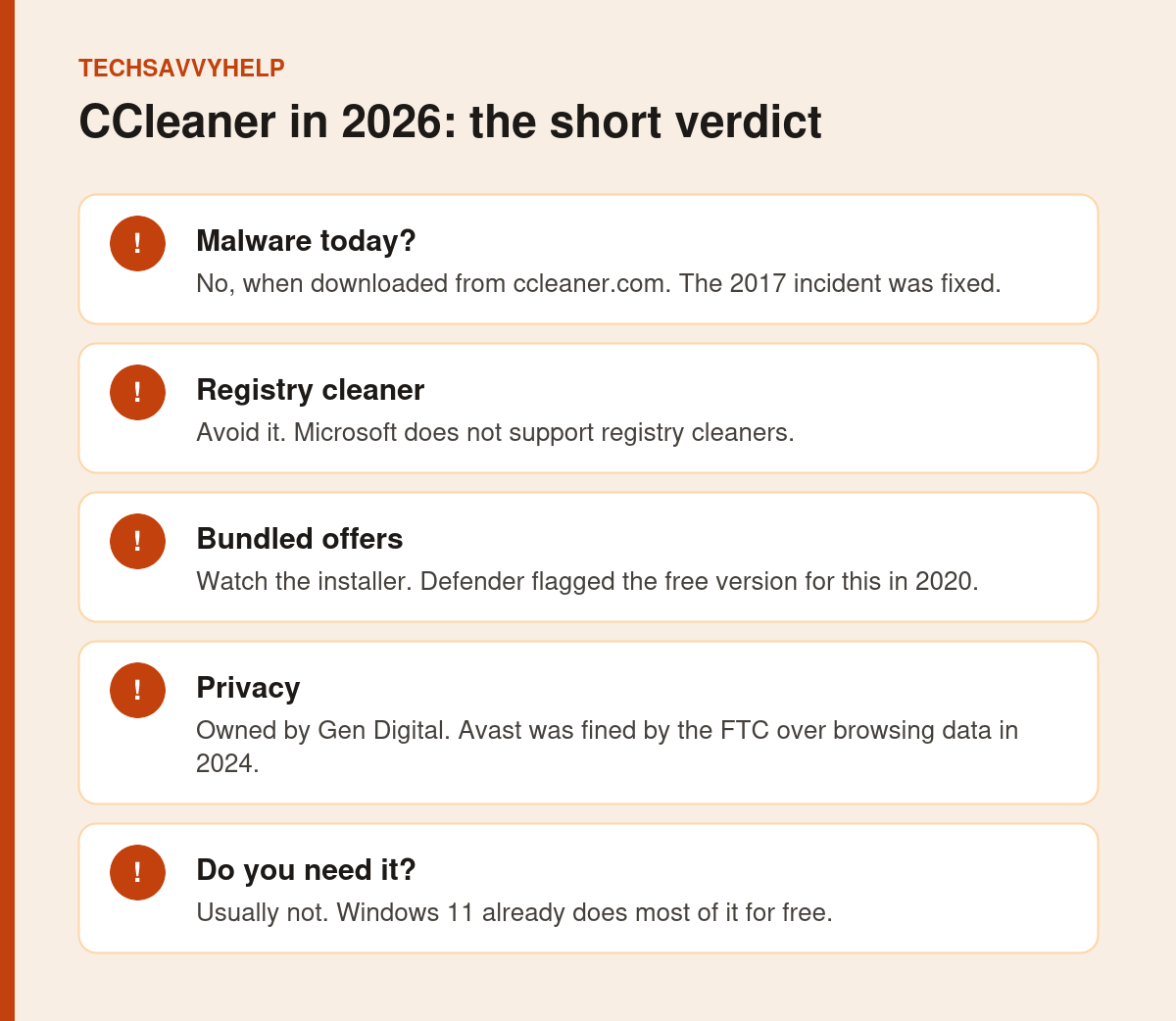
Table of Contents
ToggleWhat Happened to CCleaner
The 2017 Malware Incident
In 2017, shortly after Avast bought CCleaner’s maker Piriform, attackers planted a backdoor in the official 32-bit CCleaner 5.33 build. Cisco Talos found it, and the tainted version had been downloaded about 2.27 million times before it was removed. The current versions are not affected, but the incident showed how a trusted tool can become a delivery route for malware.
Microsoft Defender Flags the Free Version
On 29 July 2020, Microsoft added a detection for CCleaner as a potentially unwanted application. Microsoft told BleepingComputer the detection targeted the free version because its installer bundled offers for other software. Piriform called it a false positive.
The Avast Browsing Data Case
CCleaner is now owned by Gen Digital, formed when NortonLifeLock bought Avast. In June 2024, the US Federal Trade Commission finalised a $16.5 million order against Avast for selling browsing data from its antivirus software and browser extensions through its Jumpshot subsidiary. The FTC order did not name CCleaner, but it is a fair reason to check privacy settings in any product from the same group.
Is CCleaner Safe to Use Today?
From the official site, yes, in the sense that it is not malware. CCleaner 7 has a new interface, an uninstaller, a disk analyzer, a duplicate finder and a startup manager, and its version history shows regular updates through 2026.
The real risks are smaller and practical:
- The registry cleaner can remove entries Windows or your apps still need.
- Installer offers can add software you did not ask for if you click through quickly.
- Upgrade prompts push the paid subscription.
- Fake download sites bundle adware or worse. Only use ccleaner.com.
Microsoft says plainly that it does not support registry cleaners. Its support policy warns that incorrect registry changes can cause serious problems that may need a Windows reinstall. Cleaning the registry does not make a modern PC noticeably faster.
Windows 11 Already Does Most of It
| Task | CCleaner feature | Free tool already in Windows 11 |
|---|---|---|
| Clear junk and temp files | Custom Clean | Storage Sense and Cleanup recommendations |
| Uninstall apps | Uninstaller | Settings > Apps > Installed apps, or winget |
| Control startup apps | Startup Manager | Task Manager > Startup apps |
| Find big files | Disk Analyzer | Settings > System > Storage > Show more categories |
| Clear browser data | Browser cleaning | Your browser’s Clear browsing data |
| Update apps | Software Updater (paid) | Windows Update, Microsoft Store, winget upgrade |
Our guide to Storage Sense in Windows 11 shows how to set it to clean temporary files and the Recycle Bin automatically.
Better Free Alternatives to CCleaner
Storage Sense and Cleanup Recommendations
Built into Windows 11 under Settings > System > Storage. It removes temporary files, old downloads and Recycle Bin items on a schedule, with nothing to install.
Microsoft PC Manager
Microsoft’s own free cleanup and boost tool, available from the Microsoft Store. Read our Microsoft PC Manager review for what it does well and where it falls short.
BleachBit
A free, open-source cleaner for Windows and Linux with no ads or upsells. It is more technical than CCleaner, so read each option before you tick it.
Task Manager and Installed Apps
For speed problems, the real fix is usually fewer startup apps and removing software you do not use. Our guide to a program that won’t uninstall covers stubborn ones.
If You Still Want to Use CCleaner
- Download it only from ccleaner.com.
- Choose Custom install and untick any extra software offers.
- Open its settings and review data sharing and background monitoring options.
- Never run the registry cleaner.
- Use the free version unless you really need a paid feature.
Speed fixes that work better than any cleaner app.
Frequently Asked Questions
Is CCleaner safe to use in 2026?
It is not malware when downloaded from ccleaner.com. Avoid the registry cleaner, decline bundled offers, and check its privacy settings.
Does CCleaner make a PC faster?
Not much on a modern PC. Removing startup apps and unused programs helps more, and Windows 11 can do that for free.
Why did Windows Defender flag CCleaner?
In 2020 Microsoft classed the free version as a potentially unwanted application because its installer bundled offers for other software.
What is the best free alternative to CCleaner?
For most people, Windows 11’s own Storage Sense, Installed apps and Task Manager Startup apps. BleachBit is a good open-source option if you want a separate cleaner.