Password management best practices have changed because much of the advice people still follow is about a decade out of date. The awkward part is that the body which popularised that advice has since formally reversed itself.
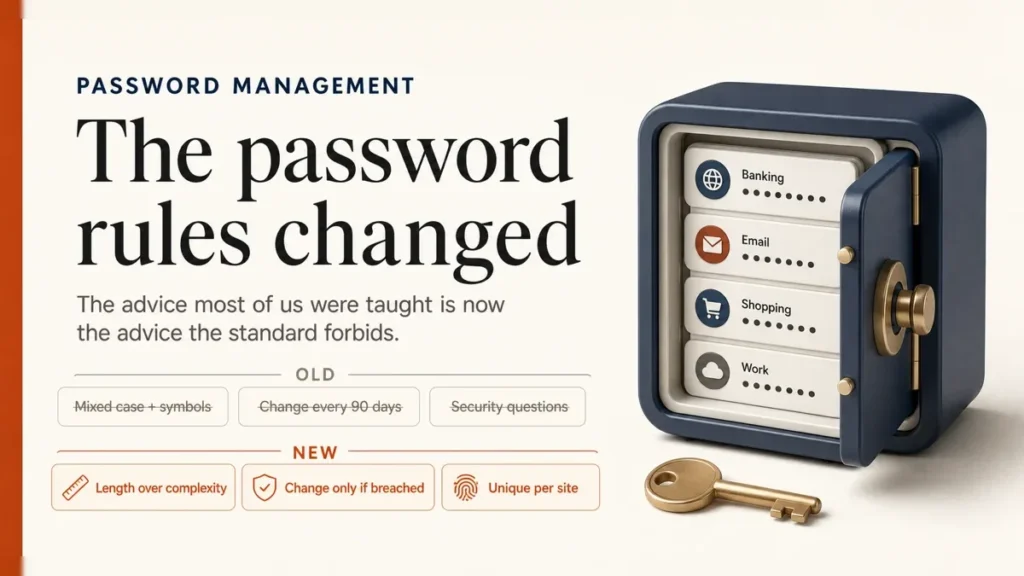
The mixed-case-and-a-symbol rule, the ninety-day reset, the security question about your first pet — the current US standard does not merely stop recommending those. It forbids them.
Rules only help if you never hand the password over; see how to protect yourself from online scams.
Length beats complexity. One long unique password per site, 15 characters or more where it stands alone. Stop changing them on a schedule — change one when there is reason to think it leaked. Use a password manager, because nobody memorises a hundred unique passwords, and give it a long master password plus the strongest second factor it offers. Take passkeys wherever they are offered.
Our guide explains how passkeys work and how to set them up.
Table of Contents
ToggleThe rules changed, and most advice has not caught up
The reference document is NIST Special Publication 800-63B, revision 4, published on 26 August 2025. It sets out what services shall and shall not do when they handle passwords, and several of its requirements are the direct opposite of what we all learned.

- Composition rules are out. A service “SHALL NOT impose other composition rules” such as requiring a mixture of character types.
- Scheduled expiry is out. Verifiers “SHALL NOT require subscribers to change passwords periodically” — but they SHALL force a change on evidence the password has been compromised.
- Security questions are out. Services shall not prompt for knowledge-based answers or store a hint an unauthenticated visitor could reach.
- Length is in. A 15-character minimum where the password stands on its own, 8 where a second factor is also required, and services should accept at least 64 characters, all printable ASCII, spaces and Unicode.
- Breach screening is in. Services shall check a proposed password against a blocklist of known compromised and commonly used ones.
Many stolen passwords start with a phishing link, so learn how to check if a link is safe.
Composition rules and forced resets did not produce unpredictable passwords. They produced predictable ones: a capital at the front, a digit and an exclamation mark at the end, and a counter that ticks up every quarter. Spring2026! satisfies every legacy rule and is trivially guessable. The rules were optimising a measure of strength that attackers had already learned to model.
What actually makes a password strong
Length is the lever that matters, because each additional character multiplies the work an attacker has to do while costing you almost nothing. A long string of ordinary words beats a short scramble of symbols, and you can actually type it on a phone.
The strength comes from the words being picked at random, not from them being obscure. A phrase you composed yourself tends to follow grammar and personal association, both of which narrow the search. Let your password manager generate it — and then you do not need to remember it anyway.
The second property matters more than strength, and gets less attention: uniqueness. A magnificent password used on six sites is one breach away from unlocking all six, because credential-stuffing attacks simply replay leaked pairs everywhere. A mediocre unique password fails on exactly one site. This is the single highest-value change most people can make.
Stop changing your passwords on a schedule
Rotation was well intentioned: if a password leaks, a reset limits how long it is useful. In practice the leak is exploited within hours and the reset arrives eleven weeks later, having meanwhile pushed the account holder toward a predictable pattern. That is why the standard now forbids requiring it.
What replaces it is event-driven: change a password when there is a reason. A breach notification from the service, a credential turning up in a leak, a shared password when someone leaves, or anything that looks like unauthorised access. Otherwise leave a strong unique password alone.
You cannot fix that from your side, and arguing with the login screen is not a strategy. Use a manager to generate a genuinely new password each cycle rather than incrementing the old one — the pattern is the weakness, not the change itself.
The same applies to your PC sign-in; here is how to change your Windows password.
Why a password manager is the whole answer
Every recommendation above collapses without one. Nobody memorises a hundred unique 15-character passwords, which is why people reuse: not carelessness, arithmetic. The manager is the thing that makes unique-everywhere achievable, and it is worth more than any individual habit on this page.
It generates passwords, stores them encrypted behind one master password, and fills them in for you.
That last part carries a security benefit people rarely notice: a manager fills based on the site’s actual domain, so on a convincing lookalike login page it simply will not offer the credential.
You get a quiet signal that something is wrong at exactly the moment you would otherwise be fooled.

Choosing one, without the ranking nonsense
- Built into your platform — iCloud Keychain, Google Password Manager. Free, already there, and genuinely good now, including passkey support.
- Open source and standalone — Bitwarden publishes its source and its free personal tier covers unlimited passwords on unlimited devices, with passkey storage and encrypted export.
- Commercial and standalone — 1Password, Dashlane, Keeper and others, generally paid, generally with more family and sharing features.
For free options compared side by side, see the best free password managers.
If every device you own runs the same ecosystem, the built-in manager is likely enough and the friction of adopting it is near zero.
If you move between Windows, Android, macOS and iOS — or you want to share credentials with family — a standalone manager is worth the setup. There is no wrong answer here; using none is the wrong answer.
Whatever you pick, check four things: it syncs to every device you actually use, it stores passkeys, it can export your vault so you are never locked in, and the encryption happens on your device so the vendor cannot read your entries. That last one is what makes the next section survivable.
What the LastPass breach should actually teach you
In December 2022 LastPass disclosed that an attacker had copied backup customer vault data. It is worth being precise about what that did and did not mean, because the incident gets used to argue both that managers are unsafe and that nothing happened.
The vault fields holding usernames, passwords, secure notes and form data stayed encrypted, and LastPass never holds master passwords, so they were not taken.
But alongside the encrypted material the attacker got unencrypted company and end-user names, billing and email addresses, telephone numbers, the IP addresses customers connected from — and the website URLs stored in those vaults.
Which is to say: not the keys, but a precise list of which locks each person owns.
This is the part that generalises beyond one company. When a live service is breached you can change the password and be done. When an encrypted vault is exfiltrated, the attacker keeps it and can grind against it indefinitely as hardware gets cheaper.
The only thing standing in the way, forever, is how strong the master password was on the day it was copied. Make that one long, make it unique, and put the strongest second factor your manager offers on the account.
None of which is an argument for going without. The alternative most people fall back on is reuse, which fails more often, more quietly, and without anyone publishing a disclosure notice about it.
Where passkeys fit
Passkeys are the direction the whole problem is moving. Rather than adding a step to the password, a passkey replaces it: your device holds a key, proves it holds the key, and nothing reusable is ever sent. A convincing fake login page cannot extract anything useful, because there is nothing to type in.
For password management the practical point is that most managers now store and sync passkeys alongside passwords — iCloud Keychain, Google Password Manager, Bitwarden, 1Password, Dashlane. So adopting them is not a migration. Turn one on wherever a site offers it, keep passwords for everywhere else, and expect to run both for years.
The other half of this: which second factors resist phishing and which only look like they do.
Find out whether you are already in a leak
The standard now requires services to screen new passwords against lists of known-compromised ones. You can run the same check on yourself: Have I Been Pwned tells you which breaches an email address has appeared in, which is usually a more sobering list than people expect.
Most password managers do this continuously and flag reused, weak or breached entries in a dashboard. Work down that list from the accounts that can reset the others — email first, then the manager itself, then banking — rather than starting at the top alphabetically.

Common mistakes to avoid
- Reusing one strong password. Strength does not survive somebody else’s breach.
- Clever substitutions. P@ssw0rd is on every cracking list; the substitutions were modelled decades ago.
- Answering security questions truthfully. Your mother’s maiden name is public. Treat them as extra passwords and store the answers in your manager.
- Sending credentials by email or chat. They persist in two mailboxes indefinitely. Use your manager’s sharing feature.
- No plan for the manager itself. If you lose the master password most managers genuinely cannot help you — that is the design. Set up the recovery kit at signup, not later.
- Assuming the manager protects a compromised device. A keylogger reads the password as you type it, and autofill does not help if malware is already resident.
A manager cannot defend a machine that is already compromised, so the device matters too.
What to do this week
- Pick a manager from whichever category above fits, and import whatever your browser has already saved.
- Set a long master password — a generated passphrase you write down once and keep somewhere physical until it sticks.
- Turn on a second factor for the manager itself, and save its recovery codes offline.
- Fix the top three accounts: email, the manager, then banking. Unique generated passwords, second factor on each.
- Work through the reuse report at whatever pace you like. It does not need to happen in one sitting, and partial progress is real progress.
Keep an encrypted export of your vault as part of your regular data backup.
Our complete Windows 11 security checklist, with links to every security guide.
Password Management: Frequently Asked Questions
How long should a password be?
NIST sets a 15-character minimum where the password is the only factor, and 8 where a second factor is also required. Services should accept at least 64 characters. Beyond meeting the minimum, longer is straightforwardly better, and a generated passphrase gets you there without anything to memorise.
Should I change my passwords regularly?
No. The standard explicitly forbids services from requiring periodic changes, because rotation pushes people toward predictable patterns. Change a password when there is a reason to — a breach notice, a credential appearing in a leak, or a shared password after someone leaves.
Are password managers still safe after the LastPass breach?
The encrypted vault fields stayed encrypted and master passwords were never held by LastPass, though unencrypted account details and the list of stored site URLs were taken.
The lesson is that a copied vault can be attacked offline forever, so the master password has to be long and the account needs a strong second factor. It remains far safer than reusing passwords.
Is my browser’s built-in password manager good enough?
For most people living in a single ecosystem, yes — iCloud Keychain and Google Password Manager both generate, sync and now store passkeys. Standalone managers earn their keep when you cross ecosystems, share with family, or want features like encrypted export and breach dashboards.
What happens if I forget my master password?
With most managers, nothing can be done — they cannot decrypt your vault either, which is precisely why the vendor being breached does not expose your passwords. That trade-off is the product. Set up whatever recovery kit or emergency access your manager offers on the day you sign up.