

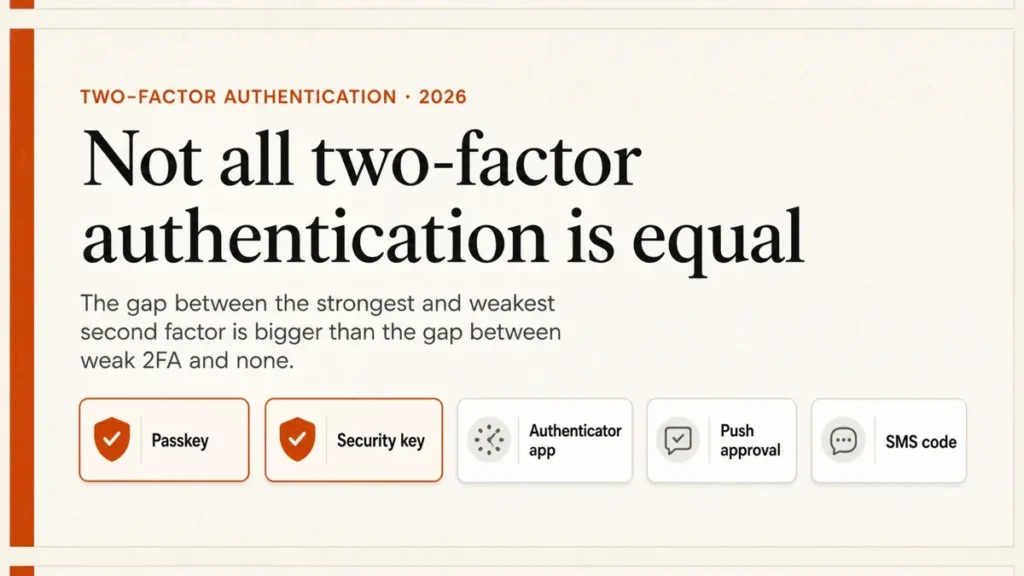
Every security guide tells you to turn on two-factor authentication. Almost none of them tell you which kind, and that turns out to be the part that matters. The distance between the weakest second factor and the strongest is wider than the distance between having no second factor and having a weak one.
The ground has also moved. American cybersecurity authorities now class most of what people call 2FA as phishable, and Microsoft has published dates for switching off SMS and voice codes on work accounts entirely. This is what the current advice actually says, and what to do about it on your own accounts.
Attackers also use a fake Google security alert to trick people into reading out a code.
Use a passkey or a security key anywhere it is offered — that is the only tier authorities call phishing-resistant. Where it is not offered, use an authenticator app. Treat SMS codes as a last resort, but still turn them on if they are the only option: weak two-factor authentication beats none. Then save your recovery codes.
Table of Contents
ToggleWhat two-factor authentication actually is
Two-factor authentication asks for two different kinds of proof: something you know, normally a password, plus something you have or something you are. The point is that stealing the password alone gets an attacker nowhere.
That is the theory, and it is sound. The problem is the second half.
If your second factor is something that can be read out, typed in, or approved by tapping a button, then it can also be handed to an attacker by a person who has been convinced they are talking to their bank.
Everything below follows from that one distinction.
Not all 2FA is equal: the ranking that matters
The US Cybersecurity and Infrastructure Security Agency publishes a fact sheet on phishing-resistant MFA that sorts the methods into tiers, and it is blunter than most consumer advice.
Only two things qualify as phishing-resistant: FIDO/WebAuthn — which CISA calls “the only widely available phishing-resistant authentication” — and PKI-based smart cards, which in practice means government and enterprise badges.
A good free password manager can store passkeys as well as passwords.
Everything else is ranked below that, and SMS sits at the bottom as what CISA describes as “the last resort MFA option”.

The attacks are different at each level, not just more or less likely. Phishing-resistant methods are immune to push bombing, SS7 interception and SIM swapping by design — those attacks have nothing to grab. App codes remove the SIM problem but not the phishing one. SMS has all of them at once.
SMS and voice codes: the last resort
A code texted to your phone is the most familiar form of 2FA and the weakest one in common use.
Three separate problems stack up: a SIM swap moves your number to someone else’s handset, weaknesses in the SS7 telephone signalling network allow interception, and a fake login page can simply ask you to type the code in, then use it within its 30-second life.
Standards bodies have caught up with this. In NIST SP 800-63B revision 4, published on 26 August 2025, out-of-band authentication over the public telephone network is classed as restricted: organisations using it must offer subscribers a different option, warn them about its limitations, and watch for signals like a recent SIM change or number port before sending a code at all.
On work and school accounts in Microsoft Entra ID — not personal Microsoft accounts — passkeys became the default sign-in experience on 1 September 2026, and Microsoft-provided SMS and voice delivery is fully retired on 1 February 2027. After that, a user whose only method is SMS or voice must register a passkey to continue; organisations that still want text codes have to contract their own telecom provider.
Microsoft’s stated reasoning is that “SMS and voice are no longer positioned as secure authentication methods”. If your workplace has not mentioned this yet, it will.
Phishing kits now use AI to capture codes in real time; see how to protect yourself from AI scams.
None of which means you should switch SMS off tonight. If a service offers nothing else, SMS 2FA is still far better than a password on its own. It is a floor, not a target.
Authenticator apps: better, still phishable
An authenticator app generates a six-digit code that changes every thirty seconds. The code is calculated on your device from a shared secret set up when you scanned the QR code, so it works with no signal and no network.
That removes the SIM swap and the SS7 problem in one step, which is why moving from SMS to an app is the single most worthwhile change most people can make.
CISA lists app-based one-time codes as vulnerable to phishing, and the reason is uncomfortable: a convincing fake login page asks for your password and your code, then relays both to the real site within the thirty seconds they are valid. The app cannot tell that the page asking is not the real one. Only the phishing-resistant tier can.
Push approvals and push bombing
Approval prompts — the pop-up that asks “is this you?” — are more convenient and have their own failure mode. An attacker with your password can fire off prompts repeatedly until you tap approve to make them stop, at two in the morning. CISA names this push bombing and lists push without number matching as vulnerable to it.
Number matching is the fix: the login screen shows a number and you type it into the app, so an approval you did not initiate is one you cannot complete. If your app offers it, it is on by default in most modern implementations, and it is worth checking.
Passkeys and security keys: the phishing-resistant tier
This tier works differently. Instead of a shared code that can be repeated to anyone, your device holds a private key and the site holds the matching public one.
When you sign in, your device proves it holds the key without ever sending anything reusable, and — this is the part that defeats phishing — the credential is bound to the real site’s domain.
A lookalike page at a lookalike address cannot get a usable answer out of it, no matter how convincing it is or how cooperative you are being.
What a passkey actually is
A passkey is a FIDO credential stored on your phone, computer or security key, unlocked with the same face scan, fingerprint or PIN you already use to unlock the device.
The FIDO Alliance is clear that it is a replacement for the password, not a second factor bolted on beside one — and that a passkey on its own is more secure than a password combined with a one-time code or a phone approval.
Passkeys sync between your devices through whichever credential manager you use, end-to-end encrypted: iCloud Keychain, Google Password Manager, 1Password, Dashlane and others. All the major operating systems and browsers support them. In a 2024 FIDO Alliance survey, 53% of people said they had enabled passkeys on at least one account.
Here is how to set up and use passkeys.
A FIDO2 security key is a passkey that lives on a small device you keep on a keyring rather than syncing to the cloud. Nothing to intercept and nothing to sync, at the cost of a physical object you can lose — which is why anyone using one should register a second key and keep it somewhere else.
Biometrics and email codes, briefly
Biometrics are usually misunderstood. Your fingerprint is not being sent anywhere; it unlocks a credential held on the device. That is why Face ID on a passkey is genuinely strong, while “biometric login” in an unfamiliar app might be nothing more than a convenient wrapper around a stored password. What matters is what the biometric unlocks.
Email codes sit around the same tier as SMS and can be worse. A code sent to an inbox is only as protected as that inbox, so if your email account is secured with a password and nothing else, an email code is not really a second factor at all — it is the same factor twice.
What to do, in order
Not every account deserves the same effort. Work down this list and stop when you run out of patience; the first two cover most of the risk.
- Your main email account. Everything else resets through it, so it is the account an attacker actually wants. Passkey if offered, authenticator app otherwise.
- Your password manager. Same reasoning, more concentrated.
- Banking and anything holding money. Take whatever the strongest option your bank offers is, even if it is clumsy.
- Social and shopping accounts. An authenticator app is fine here.
- Everything else. SMS if that is all there is.
Your password manager is the other half of this, and it should be the first thing you protect.
Recovery codes: the step everyone skips
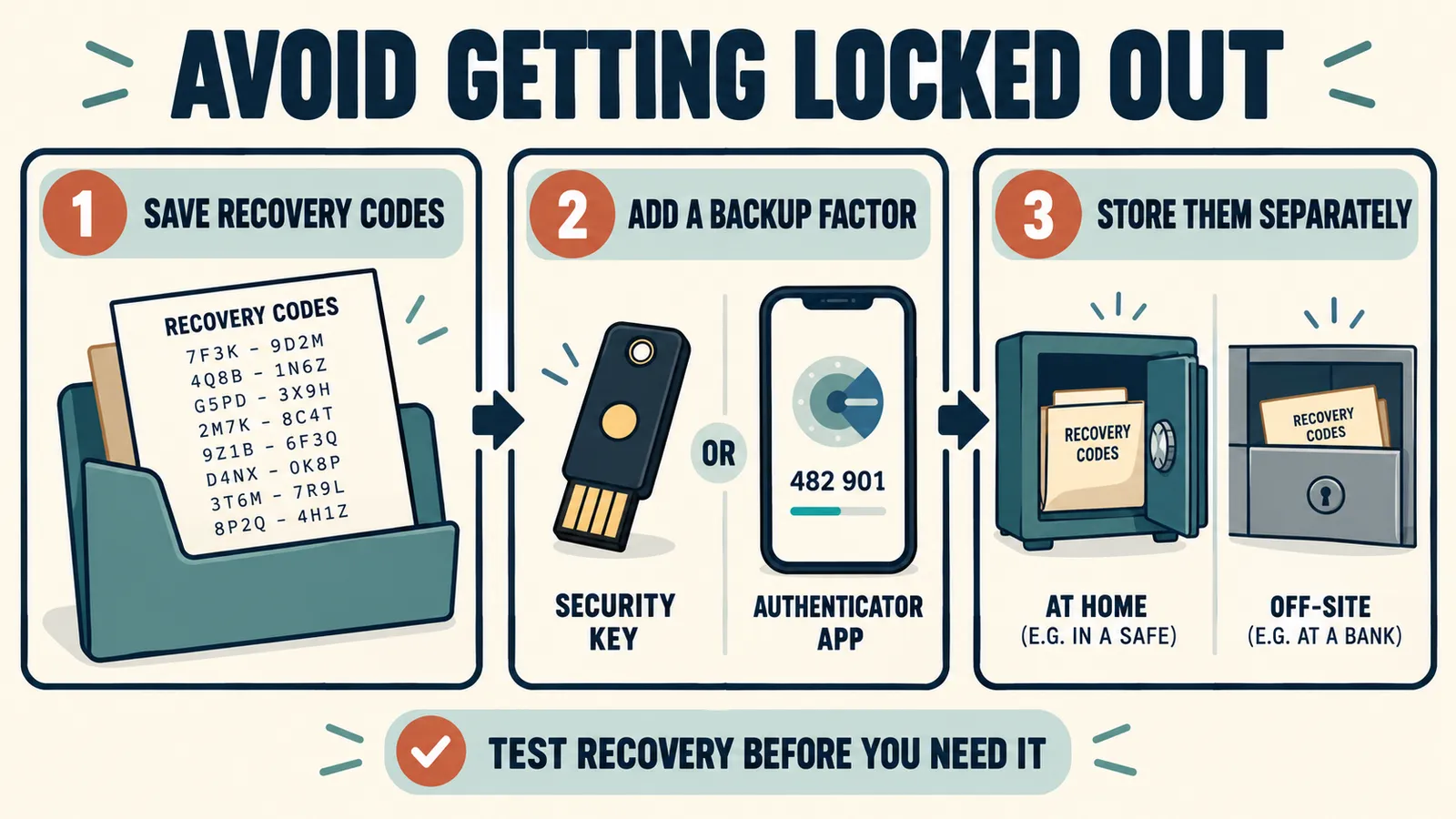
For most people the realistic risk is not being hacked. It is losing the phone and being locked out of their own email, permanently, on a Sunday. Every service that offers 2FA also offers recovery codes when you switch it on, and almost nobody saves them.
Print the recovery codes and put them somewhere physical, or store them in your password manager under a different account than the one they unlock.
Then register a second method where the service allows it — a second security key, or an app on a tablet as well as a phone. One registered factor is one device away from a very bad week.
Common mistakes to avoid
- Treating 2FA as a single thing. “I have 2FA on” says nothing until you know which kind.
- Keeping the authenticator app on the same phone as everything else, with no backup. Fine until the phone goes in a river.
- Approving a prompt you did not trigger. That prompt is the attack, not a glitch.
- Assuming 2FA makes a weak password acceptable. It raises the floor; it does not raise the ceiling.
- Switching SMS off before setting the replacement up. Set up the new method, confirm it works, then remove the old one.
Phishing is the attack most of this is defending against, so it helps to recognise it.
Where this is heading
The direction of travel is passwordless. The Entra ID dates above are the leading edge of it, and enterprise deadlines have a way of arriving in consumer products a year or two later. CISA’s public guidance already frames the move to phishing-resistant methods as the goal rather than an upgrade.
Our complete Windows 11 security checklist, with links to every security guide.
Two-Factor Authentication: Frequently Asked Questions
Is SMS two-factor authentication safe?
It is the weakest form in common use. CISA calls it the last resort option, and NIST SP 800-63B revision 4 classes telephone-network codes as restricted. It is still meaningfully better than a password alone, so use it where nothing else is offered — just do not treat it as settled.
Is a passkey the same as two-factor authentication?
Not quite. A passkey replaces the password rather than adding to it, and the FIDO Alliance argues that a passkey on its own is stronger than a password plus a one-time code. Practically, if a site offers passkeys, that is the option to take.
Which authenticator app should I use?
The differences are small and any reputable one works, because they all implement the same standard. What matters more is that it backs up or syncs, so losing the phone does not lock you out of every account at once.
What happens if I lose my phone?
This is what recovery codes are for, which is why they are worth saving at setup. Failing that, most services have an account recovery process that is slow and intrusive by design. Registering a second factor in advance avoids all of it.
Can two-factor authentication be bypassed?
Some kinds, yes. Real-time phishing pages can relay app codes, push bombing can wear people into approving, and SIM swaps defeat SMS. That is exactly what phishing-resistant methods are designed to stop, and why the tier you pick matters more than simply having 2FA switched on.
The short version
Turning on two-factor authentication was the advice for a decade, and it worked well enough that attackers adapted. The advice now has a second half: pick a method that cannot be repeated to someone who asks nicely.
Passkeys and security keys where you can, an authenticator app where you cannot, SMS rather than nothing, and recovery codes saved before you need them. That covers almost everything, and it takes an evening.





3 Responses